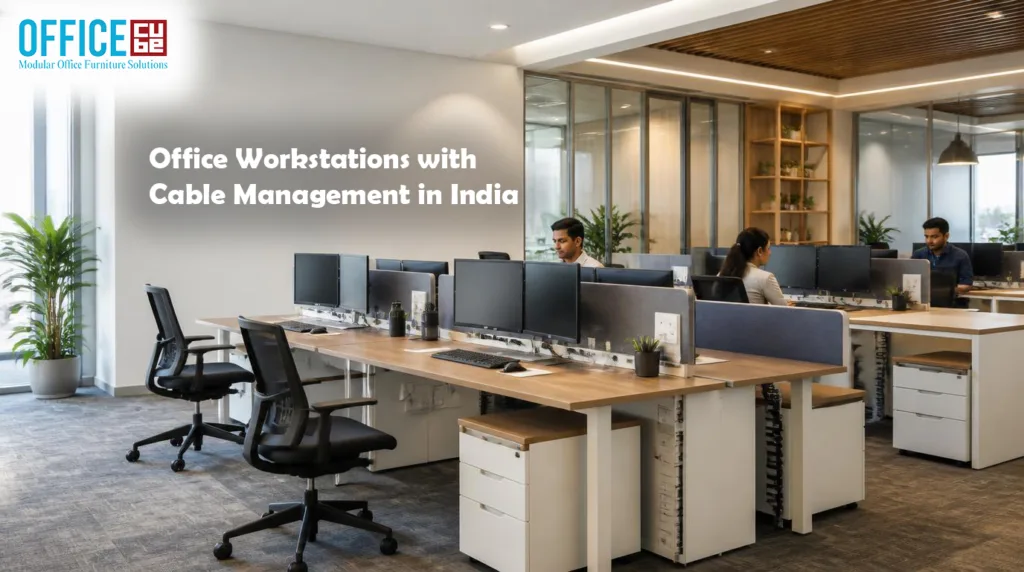
If you are planning a new office, renovating an existing workspace, or expanding your team, office workstations with cable management in India can make a surprisingly big difference to the way the entire workplace looks and functions. A workstation is no longer just a desk with a partition attached to it. Today, businesses need furniture that can accommodate computers, monitors, chargers, networking equipment, power cables, storage accessories, and the everyday tools employees depend on without turning the desk into a maze of wires. A well-designed workstation keeps these practical requirements under control while giving employees a comfortable and professional place to work.
The need becomes even clearer when an office has multiple employees sitting close together. One unmanaged cable may not seem like a serious issue, but dozens of power cords, HDMI cables, Ethernet connections, keyboard wires, mouse cables, and charging leads can quickly create visual clutter. That clutter can make cleaning harder, complicate maintenance, and make it difficult to identify the right cable when equipment needs to be moved or replaced. Cable-managed office workstations solve much of this problem by incorporating features such as wire-routing channels, cable trays, modesty panels, grommets, power modules, and access points directly into the furniture.
When you buy workstations in India, however, appearance should not be the only consideration. You need to think about dimensions, materials, ergonomics, durability, office layout, installation, employee requirements, and future expansion. The right workstation should fit the room and the workflow rather than forcing your business to adapt around the furniture. This guide explores the important factors to consider so you can make a practical purchasing decision based on your office’s actual needs.
Why Cable Management Matters in Modern Indian Offices
Cable management has become a basic requirement for many workplaces because the modern desk often supports several electrical and digital devices simultaneously. A typical employee may have one or more monitors, a desktop computer or laptop, a docking station, a phone charger, a headset, networking equipment, and other peripherals. Each device can introduce another cable, and when several employees share a workstation cluster, the number increases quickly. Without a proper routing system, those cables can hang behind desks, collect around power sockets, cross walking areas, or become tangled underneath the work surface.
A workstation with integrated cable management creates a more controlled environment. Instead of allowing wires to fall wherever gravity takes them, the furniture gives them a defined path. A cable tray can hold power adapters underneath the desk, while grommets can guide cables neatly from the desktop toward the floor. Vertical cable channels can hide wires between the work surface and the power source. This approach also makes the desk easier to clean because fewer cables are lying directly on the floor or piled behind equipment.
There is also a practical maintenance advantage. Imagine that a monitor suddenly stops receiving power. In a poorly organized workstation, someone may need to crawl under the desk and trace several tangled wires just to identify the correct connection. With a well-designed cable-management system, individual cables are easier to follow and replace. For offices with dozens or hundreds of employees, small improvements like this can save time repeatedly.
Cable management also contributes to the visual identity of an office. A clean workstation can make a workspace appear more deliberate and organized, while exposed bundles of cables can make even expensive furniture look unfinished. This is particularly relevant for reception areas, meeting spaces, client-facing offices, coworking environments, and businesses where visitors regularly see employee workstations.
How Organized Cables Improve Everyday Work
The benefits of organized cables become most obvious during ordinary office activities rather than dramatic situations. Employees move monitors, connect laptops, replace keyboards, unplug chargers, clean their desks, and rearrange equipment throughout the year. A workstation that anticipates these activities is easier to live with than one that treats cables as an afterthought. The objective is not to hide every wire at any cost; it is to route, separate, secure, and access cables intelligently.
Good cable organization can also support safer movement around the office. Power and data cables that are routed through dedicated channels are less likely to become loose obstacles near feet or cleaning equipment. Under-desk trays can keep adapters away from the floor, while vertical channels can reduce dangling wires. The exact configuration depends on the electrical layout of the office, so workstation planning should be coordinated with qualified electrical professionals where electrical installation or modification is involved.
Another advantage is flexibility. Modern employees frequently work with laptops, docking stations, multiple displays, and other peripherals. If the workstation includes accessible cable ports and removable or adjustable routing components, changing the setup becomes much easier. You do not want a workstation that looks perfect on installation day but becomes difficult to use after the first equipment upgrade.
This is why cable management should be considered part of workstation design rather than an optional decoration. When selecting furniture, look underneath and behind the desk, not just at the tabletop. Ask how cables enter the work surface, where adapters will sit, how wires reach the floor, whether the channels can be opened later, and whether additional equipment can be added. Those questions reveal much more about a workstation’s practical quality than its appearance alone.
Types of Office Workstations Available in India
Indian offices use a wide variety of workstation configurations because no two workplaces have exactly the same floor plan or operating style. A small consulting company may need individual desks with generous personal space, while a call center may prioritize high-density seating. A technology company might require several monitors per employee, whereas a training center may need flexible tables that can be rearranged. Understanding the major workstation formats helps you compare products without getting distracted by surface finishes or decorative details.
Single workstations are straightforward and offer employees a dedicated working area. They can be arranged against walls or combined into larger layouts. These desks are useful when privacy, individual ownership of space, or flexible room planning is important. They also make future relocation relatively simple because each unit can potentially be moved independently.
Linear workstations place employees in a row, often facing the same direction or sitting back-to-back. This configuration can use floor space efficiently while maintaining defined individual work areas. A properly designed linear system can include shared cable trays and central electrical routing, which reduces the amount of visible wiring between desks.
Cluster workstations group multiple employees together, often around a shared central spine or partition. These systems are common when businesses want to balance space efficiency with individual work zones. The central structure can be particularly useful for cable management because power and data connections can be routed through a common channel.
Bench-style systems take the concept further by creating shared work surfaces for multiple employees. They can provide a clean, contemporary appearance and may simplify office expansion because additional seats can sometimes be added in a modular fashion. The trade-off is that privacy and personal storage need to be planned carefully.
Managers and senior employees may require larger executive or semi-private workstations. These can provide additional surface area, storage, and privacy but generally consume more floor space. The best choice depends on the job function rather than a simple hierarchy.
For Indian buyers, the important point is that workstation configuration should follow the workflow. Count the number of users, understand how they interact, identify equipment requirements, and map the available floor area before selecting a design. A beautiful workstation arrangement that restricts movement or leaves insufficient space for chairs, storage, and circulation will quickly become frustrating.
Single and Linear Workstations
Single and linear workstation formats remain popular because they are relatively easy to understand, configure, and adapt. A single workstation gives one employee a defined desk, making it suitable for offices where individual concentration or equipment ownership is important. It can also work well in smaller offices where desks need to be positioned according to doors, windows, columns, or irregular room dimensions. Since the unit stands independently, moving it during a future office reconfiguration may be simpler than dismantling a large interconnected system.
Linear workstations provide another approach by organizing several users along a common axis. Depending on the design, employees may face the same direction, face one another, or work back-to-back. A central partition can establish a visual boundary while shared cable channels can carry power and data connections. When properly planned, this arrangement creates a consistent appearance across the office and can make large installations easier to manage.
Cable management deserves particular attention with linear furniture. Because multiple users may share a common electrical and networking route, the system needs sufficient capacity for present equipment and reasonable future expansion. Look for accessible cable trays, removable covers, desk-level cable ports, and dedicated routes that prevent power and data cables from becoming tangled.
The dimensions also matter. A workstation that is technically wide enough for a monitor and keyboard may still feel cramped if employees use two monitors, documents, notebooks, or specialized equipment. Think about the actual working footprint, not simply the advertised desk dimensions. Chair movement, legroom, monitor positioning, and access to storage all affect usability.
When comparing single and linear workstations, consider whether your organization values individual flexibility or standardized space planning. Single desks can offer greater independence, while linear systems can simplify large-scale layouts. Neither format is universally suitable; the right option depends on the room, workforce, technology requirements, and plans for future growth.
Cluster and Bench Workstations
Cluster and bench workstations are often considered when a business wants to accommodate several employees efficiently without creating a maze of separate desks. A cluster may group four, six, or more users around a shared structural arrangement, while a bench system typically uses continuous or modular work surfaces. Both formats can produce a modern appearance and can make large offices feel visually consistent.
One major advantage is infrastructure efficiency. Instead of running separate cable routes to every independent desk, a workstation system can provide centralized pathways for power and data. This can make the overall installation cleaner and easier to coordinate. However, centralization only works well when the cable routes are designed with enough capacity and access points for each employee.
Privacy is another factor. Bench systems often emphasize collaboration and space efficiency, while clusters can provide a stronger sense of individual work zones through partitions. If employees handle confidential information, participate in frequent video calls, or require concentration, partition height and placement become important. If the office is highly collaborative, lower partitions may encourage communication and create a more open environment.
Storage should be considered alongside seating. A dense workstation arrangement may leave limited room for conventional cabinets, so businesses sometimes use under-desk pedestals, shared storage units, overhead cabinets, or mobile storage. The choice affects how employees keep documents and equipment within reach.
Before buying, create a scaled floor plan and test the intended configuration. Include desks, chairs, cabinets, doors, columns, walkways, electrical points, and emergency access areas. This simple planning step can expose problems that are difficult to see from product photographs. A workstation system should fit into the entire office ecosystem rather than being selected as an isolated piece of furniture.
Key Features to Look for Before Buying
When comparing office workstations, it is easy to focus on color, finish, and price because those details are immediately visible. The more important differences are often hidden. A workstation’s construction, cable-routing design, edge treatment, hardware, adjustability, storage options, and installation method can determine how well it performs after years of daily use. For a business purchase, those details deserve close attention.
Start with the work surface. Check its dimensions, thickness, edge finish, resistance to everyday wear, and suitability for the equipment employees use. A desk that looks spacious in a showroom may feel crowded when fitted with two monitors, a keyboard, documents, and personal items. If employees use monitor arms, confirm that the surface and mounting arrangement can support the intended hardware.
Next, inspect the structure. The frame should feel stable when the desk is used normally. Panels should align properly, hardware should feel secure, and moving parts should operate smoothly. For larger workstation systems, the joining mechanism is especially important because repeated movement or expansion can put stress on connection points.
Then examine cable management. Look for cable trays, wire channels, grommets, access covers, vertical raceways, and integrated power modules. Ask whether the channels are accessible after installation. A cable system that requires complete disassembly whenever a cable needs replacing may look tidy but be inconvenient in practice.
Partition design can also influence usability. Acoustic or visual panels may provide separation between employees, while glass elements can preserve a more open appearance. Consider how partitions interact with monitor placement and lighting.
Finally, think about future needs. Employees may receive additional monitors, docking stations, or other equipment. A workstation should not become obsolete simply because the technology changes. Modular cable routes and adaptable accessories can make the furniture useful for longer.
Built-In Cable Management Systems
Built-in cable management can range from a simple desktop grommet to a sophisticated system running through the entire workstation structure. The right level depends on the number of devices, workstation configuration, and office infrastructure. A small single desk might need only a rear cable tray and one or two grommets, while a large cluster could require shared horizontal and vertical routing.
Cable trays are among the most practical components because they keep adapters and excess cable underneath the desk rather than on the floor. Look for trays that provide enough depth and width for power bricks without forcing cables into sharp bends. If employees use several adapters, a tray with generous capacity can be considerably easier to maintain.
Grommets provide a controlled passage between the desktop and the space below. Their position matters. A grommet placed too far from the equipment may leave cables stretched across the surface, while one placed in a useful location can keep the desk neat with minimal effort.
Vertical cable channels help route wires from the desktop toward floor-level power and networking connections. They are especially useful in bench and cluster systems. Some designs integrate these channels into the central spine or partition, which keeps the wiring visually contained.
Power modules can also be incorporated into the desktop. These may provide electrical outlets, USB connections, data ports, or other interfaces depending on the product. When selecting such features, verify the electrical specifications and installation requirements rather than assuming every module is appropriate for every office setup.
Good cable management should also allow accessibility. A system that completely hides wires but makes them impossible to reach is not necessarily better. Employees and maintenance teams need a practical way to add, remove, identify, and service connections.
Materials and Construction Quality
The material used in an office workstation affects its appearance, strength, maintenance requirements, and lifespan. In India, commonly available workstation designs may use engineered wood products, laminate surfaces, metal frames, glass, fabric panels, or combinations of these materials. The right combination depends on the environment and budget, but construction quality matters as much as the material name.
For work surfaces, engineered boards with a durable decorative laminate are widely used because they can provide a consistent appearance and relatively easy cleaning. The thickness and edge treatment should be checked rather than judged from photographs. Edges receive frequent contact from hands, chairs, equipment, and cleaning activity, so poorly finished edges can become a visible weakness over time.
Metal frames can provide structural support and are common in modular workstation systems. Inspect joints, fasteners, brackets, and leveling components. A frame that feels rigid and stable during everyday use is preferable to one that flexes noticeably when pressure is applied. For larger systems, the frame must also integrate properly with partitions and cable-routing components.
Partitions may use laminate, fabric, glass, acoustic materials, or composite constructions. Fabric can add visual warmth and potentially help with acoustic treatment, while glass can maintain sightlines and an open appearance. The decision should reflect the workplace environment rather than simply following a design trend.
Durability also depends on manufacturing and assembly quality. Two products made from similar materials can perform differently because of differences in hardware, edge finishing, joints, and quality control. Ask suppliers for specifications, warranty terms, load information where relevant, and installation details. If you are buying hundreds of workstations, request samples or inspect a completed installation before placing a large order.
A professional supplier should be able to explain what materials are used and how the workstation is assembled. Vague descriptions such as “premium quality” are less useful than measurable information about dimensions, board thickness, finishes, hardware, warranty, and included accessories.
Ergonomics and Employee Comfort
A workstation is part of an employee’s daily working environment, so comfort should be considered alongside appearance and space efficiency. Ergonomics is not simply about buying an expensive desk. It involves arranging the work surface, monitor, keyboard, chair, lighting, and accessories so that employees can work in a practical posture and adjust their equipment as needed.
The desk height needs to work with the chairs and equipment used in the office. Employees vary in height, so a one-size arrangement may not suit everyone equally. Where possible, furniture should provide enough flexibility for employees to position their screens and input devices comfortably. Monitor arms, adjustable accessories, and suitable chairs can complement a fixed workstation.
Monitor placement is especially relevant to cable management. Modern employees may use one large display or several screens, and each configuration introduces different cable-routing requirements. A desk should provide enough depth and a sensible route for display and power cables. If monitor arms are planned, check how they attach to the desk and whether the cable system can accommodate the additional wires.
Legroom is another easily overlooked issue. Under-desk pedestals, cable trays, structural panels, and computer holders should not unnecessarily interfere with the employee’s legs. A workstation can look neat while still feeling cramped if too much hardware occupies the underside.
Lighting and screen position should also be considered during office planning. A workstation placed directly opposite a bright window may create reflections, while a poorly positioned light can produce uncomfortable glare. Furniture cannot solve every lighting issue, but its orientation and configuration can either help or make the situation harder.
Comfort ultimately comes from the entire setup. A good workstation is not merely a desk; it is the platform around which the employee’s working environment is organized. When choosing furniture, evaluate the chair, monitor position, keyboard area, storage, lighting, and cable routes as one system.
Workstation Size and Office Space Planning
Choosing the right workstation size starts with understanding how much usable space the office actually has. Measuring only the room’s wall-to-wall dimensions is not enough. You also need to account for doors, windows, columns, electrical points, circulation paths, storage, meeting areas, equipment zones, and other fixed elements. A workstation plan that ignores these factors may technically fit on paper while making the room uncomfortable to navigate.
Employee count is another obvious but important factor. Determine the number of seats required immediately and consider expected growth. If the company expects to add employees within the next year or two, it may be more efficient to choose a modular workstation system that can be expanded instead of purchasing a completely different furniture range later.
Workstation depth matters because it affects both the desk and the circulation space behind employees. A deeper work surface can provide valuable equipment space, but it consumes more floor area. In smaller offices, a more compact configuration may create better overall functionality by preserving movement and shared space.
Do not forget storage. If every employee needs a pedestal, locker, or personal cabinet, those elements consume floor space. Shared storage can reduce the footprint, but it may be less convenient for certain teams. Storage requirements should therefore be mapped before the final workstation count is decided.
Cable routing should be included in the floor plan as well. The ideal workstation arrangement is not necessarily the one that places every desk closest to a wall socket. Data and power infrastructure may require dedicated routes, and electrical work should be planned appropriately by qualified professionals.
A scaled floor plan is one of the most useful tools in the buying process. Mark the workstation dimensions, chair zones, walkways, storage, doors, and infrastructure points. Then test multiple layouts. This process can reveal whether a slightly narrower desk creates more usable room or whether a bench arrangement offers a practical alternative to individual desks.
Office Workstation Designs for Different Workplaces
Different workplaces demand different workstation characteristics. A startup office may prioritize flexibility and collaboration, while a finance department may require more storage and privacy. A customer-service center may need high-density seating and robust cable infrastructure, while a design studio may require unusually large work surfaces for monitors and creative equipment.
For corporate offices, modular clusters and linear systems can create a consistent appearance across departments. Partitions can establish individual zones while still allowing communication. Centralized cable management can simplify infrastructure in larger installations.
For small businesses, individual or compact workstations may offer more flexibility. A small office often has an irregular layout, so modular furniture that can be moved or reconfigured can be useful. Storage should be planned carefully because floor space is limited.
For IT and technology teams, cable capacity becomes particularly important. Employees may use multiple monitors, docking stations, test devices, networking equipment, and other peripherals. A workstation that looks sufficient for a conventional computer setup may not provide enough routing space for technology-heavy users.
For call centers and customer support environments, standardization and durability can matter heavily. Workstations may be occupied continuously and may need to accommodate headsets, computers, multiple displays, and communication equipment. Easy access for maintenance can be valuable because equipment issues may need to be resolved quickly.
For creative teams, surface area and monitor support can be major considerations. Designers, architects, editors, and similar professionals may use large displays, drawing devices, reference materials, and specialized equipment. A larger surface and flexible cable routing can make a noticeable difference.
There is no universal “office workstation design” that works for every organization. The best starting point is to identify the work performed at each station. Once you understand the workflow, you can choose the furniture configuration that supports it.
How to Choose the Right Cable Management Accessories
Even a well-designed workstation may need additional cable-management accessories. The correct accessories depend on how much equipment employees use and how the workstation connects to the building’s electrical and data infrastructure. The goal should be controlled routing rather than simply hiding cables.
Start with cable trays. These are useful for keeping power adapters and excess cable off the floor. Choose a tray with enough capacity for the number of devices at each desk. Overfilling a narrow tray can create the same tangled mess you were trying to avoid.
Cable clips and ties can help organize individual wires. Reusable ties are particularly useful when employees frequently change equipment. Avoid creating bundles so tight that individual cables cannot be removed without dismantling the entire group.
Desk grommets provide clean entry and exit points. If you are ordering custom furniture, discuss grommet positions before production because placement can influence both appearance and usability. Existing desks can sometimes use retrofit solutions, but modifications should be made carefully so they do not compromise the work surface or structure.
Vertical cable spines can connect desks to floor-level points while keeping wires contained. These are particularly useful in open-plan layouts where the nearest infrastructure may not be directly below a desk.
Under-desk computer holders can also help in some environments by moving desktop computers off the floor. However, check the computer’s dimensions and weight and ensure the mounting system is appropriate. Lifting equipment off the floor can make cleaning easier, but the arrangement should not obstruct ventilation.
Cable-management accessories should complement the workstation instead of becoming an additional layer of clutter. Before buying, count the devices, identify cable paths, and determine where power and data connections enter the workstation. A simple diagram can prevent unnecessary accessory purchases.
Pricing and Budget Considerations in India
The cost of office workstations in India can vary significantly because workstation pricing depends on dimensions, materials, configuration, finish, cable-management features, storage, partitions, brand, customization, installation, order quantity, and location. For that reason, it is risky to judge a workstation purely by a per-unit headline price. A cheaper desk may require additional cable trays, partitions, storage, installation, or modifications that increase the actual project cost.
When creating a budget, separate the major components. Consider the workstation itself, cable-management accessories, chairs, storage, electrical and networking work, transportation, installation, and any customization. Some suppliers quote furniture as a complete workstation package, while others price components separately. Comparing only the base desk price can therefore produce a misleading comparison.
Quantity can also influence commercial terms. A business buying a handful of workstations may receive different pricing from a company placing a large project order. Delivery distance and installation requirements can also affect the final amount. Always ask for a written quotation that clearly identifies what is included.
The right way to evaluate cost is to consider total value over the expected service period. A durable workstation that remains stable, attractive, and adaptable for years may have a different economic profile from a lower-priced product that requires frequent repairs or replacement.
Do not assume that a higher price automatically means better quality. Request specifications and compare like with like. Check board thickness, frame construction, cable-management components, hardware, partition materials, warranty coverage, installation, and after-sales support.
For businesses working with a strict budget, modularity can provide a useful strategy. You can prioritize essential structural quality and cable management first, then add optional storage or accessories as the office evolves. The important thing is to avoid cutting features that are fundamental to the intended workflow simply to achieve an attractive initial price.
Customization Options for Office Workstations
Customization can be valuable when standard workstation dimensions do not match the office layout or employee requirements. Indian offices often operate in buildings with unusual columns, narrow rooms, varying window positions, or infrastructure constraints. A modular or customized workstation can sometimes use available space more effectively than a standard product.
Common customization areas include desk dimensions, partition height, finishes, storage, cable-routing paths, power modules, monitor-support provisions, and workstation configurations. Businesses may also request specific colors or finishes to align furniture with their brand identity. However, every customization adds complexity, so the design should remain practical.
Cable management is one of the areas where customization can provide real value. For example, a technology team may need additional cable capacity, while a conventional administrative workstation may need only basic routing. Designing the channel around actual equipment can prevent both under-capacity and unnecessary complexity.
Customization should be documented clearly. Ask for drawings showing dimensions, workstation orientation, cable access points, storage positions, and finishes before manufacturing begins. If electrical or data connections are integrated into the furniture, coordinate those requirements with the appropriate installation professionals.
There is also a useful distinction between customized furniture and modular furniture. A fully customized unit may be designed specifically for one space, while modular furniture uses standardized components that can be combined in different configurations. Modular systems can make future expansion easier because additional components may be compatible with the original installation.
When selecting a supplier, ask how modifications affect warranty and lead time. A customized workstation may take longer to produce, and replacement components may be less readily available. The best customization is not the one with the most features; it is the one that solves a genuine workplace requirement without making future maintenance unnecessarily difficult.
Installation, Maintenance, and Long-Term Durability
Installation is an important part of buying office workstations because even good furniture can perform poorly if it is assembled incorrectly. Large workstation systems require accurate alignment, secure connections, appropriate leveling, and proper integration of cable-management components. When dozens of workstations are installed together, small errors can become obvious across the entire office.
Ask the supplier whether installation is included in the quotation. If it is not, determine who will perform the assembly and whether the installer is familiar with the specific workstation system. This becomes especially important when partitions, shared cable channels, storage modules, and electrical accessories are involved.
Once installed, maintenance should remain straightforward. Cable trays and access covers should be easy to open. Fasteners should remain accessible where appropriate, and removable components should not require excessive dismantling. A workstation that can be serviced efficiently is more useful over its lifetime.
Regular cleaning also matters. Dust can accumulate underneath desks and around cable bundles, particularly in busy offices. A tidy cable system makes it easier for housekeeping teams to clean without disturbing connections. Employees should also avoid placing unnecessary weight on cable channels or pulling equipment cables sharply.
For durability, pay attention to everyday wear points. Desk edges, drawer runners, hinges, partition joints, and cable-access covers receive repeated use. A supplier that provides clear warranty information can give you a better understanding of what happens if a component fails.
Long-term value is also connected to spare parts. Before a large purchase, ask whether replacement panels, hardware, trays, grommets, and other components are available. If the workstation system is modular, future replacement may be easier than replacing an entire desk.
Where to Buy Office Workstations in India
There are several ways to buy office workstations in India, including direct manufacturers, office-furniture dealers, commercial interior suppliers, online marketplaces, and local furniture specialists. Each channel has different advantages, so the right choice depends on project size, customization requirements, delivery location, and the level of support needed.
Direct manufacturers can be useful for larger projects because they may provide customization, bulk quotations, installation, and project coordination. A dealer may offer products from several manufacturers, giving you a broader range of designs to compare. Local suppliers can be convenient when site visits, measurements, or quick service are important.
Online purchasing can simplify initial product research, especially when you want to compare dimensions, finishes, and advertised specifications. However, photographs cannot always reveal construction quality or the practical usability of cable management. For a significant office investment, consider seeing a sample or completed installation before committing to a large quantity.
Ask suppliers for a detailed quotation rather than a single total number. The quotation should identify workstation dimensions, materials, partitions, cable-management components, storage, installation, transportation, taxes where applicable, and warranty terms. Clear documentation reduces the chance of misunderstandings.
You should also ask about delivery timelines. Large workstation projects may involve manufacturing, transportation, unloading, assembly, and coordination with electrical or networking work. If your office has a fixed opening date, include adequate scheduling time rather than assuming furniture will arrive immediately after payment.
When comparing suppliers, focus on documented specifications and service terms. A professional supplier should be able to explain the product clearly and answer practical questions about installation and maintenance. If information is unclear, request clarification in writing before placing the order.
Buying Checklist for Business Owners
A workstation purchase becomes much easier when you use a structured checklist. Instead of choosing a product because it looks attractive in a catalog, evaluate it against the actual requirements of your office. This also makes it easier to compare quotations from different suppliers.
Before placing an order, confirm the number of workstations required and whether additional seats may be needed in the near future. Measure the office and create a layout showing desks, chairs, storage, walkways, doors, windows, columns, and infrastructure. Confirm that the selected workstation dimensions work with the available space.
Then review the workstation itself. Check the work-surface dimensions, material, edge finish, frame construction, partition type, storage options, and hardware. If the supplier provides product specifications, keep them with the quotation and purchase documentation.
For cable management, confirm the number and location of cable grommets, trays, vertical channels, access panels, and power or data modules. Ask whether the system can accommodate additional equipment later. If your employees use multiple monitors or specialized devices, make sure the routing capacity reflects that reality.
Commercial terms should also be documented. Check the quotation for installation, delivery, warranty, taxes, customization, and payment conditions. For a large purchase, clarify what happens if components arrive damaged or if measurements differ from the agreed drawings.
Finally, inspect a sample whenever possible. Sit at the workstation, test the available space, look underneath the desk, examine the cable routes, and operate drawers or access panels. A few minutes of physical inspection can reveal practical details that product photographs cannot show.
Common Mistakes to Avoid When Buying Workstations
One common mistake is choosing a workstation based almost entirely on appearance. A stylish finish can attract attention, but employees interact with the furniture for hours every working day. If the desk is too small, the cable routing is inadequate, or the structure is inconvenient, the attractive finish will not compensate for those shortcomings.
Another mistake is treating cable management as an accessory to purchase later. Retrofitting cable control can be possible, but integrated routing is often cleaner and easier to maintain. Decide how equipment will connect before finalizing the furniture design.
Businesses also sometimes underestimate future equipment. A desk may be designed around a single monitor, only for employees to receive a second display later. If the workstation has limited surface area or cable capacity, that upgrade can create clutter. Planning for reasonable expansion can make the furniture more adaptable.
Ignoring the floor plan is another costly error. A workstation may fit dimensionally while leaving inadequate circulation space or interfering with doors and storage. Always test the complete layout, including chairs and employee movement.
Buyers can also overlook installation and after-sales support. Furniture does not become a successful office installation simply because the boxes arrive. Assembly, alignment, cable routing, replacement parts, and warranty service can all affect the experience after purchase.
Finally, avoid comparing prices without comparing specifications. Two quotations can look dramatically different while describing different levels of furniture, accessories, installation, or service. The most useful comparison is a like-for-like comparison based on clearly documented requirements.
Conclusion
Choosing office workstations with cable management in India is ultimately a matter of combining furniture design with real workplace requirements. The best purchase is not defined by a particular color, shape, or price point. Instead, it should provide an appropriate working surface, reliable construction, practical ergonomics, sensible space utilization, and a cable-management system that supports the technology employees actually use.
Start by understanding your office layout and employee workflow. Decide whether individual, linear, cluster, or bench workstations fit the way your teams operate. Then examine the details that are easy to overlook: cable trays, grommets, vertical routing, partition design, frame construction, surface dimensions, storage, accessibility, and future expansion.
Budget should be considered carefully, but the initial purchase price is only one part of the equation. Delivery, installation, accessories, maintenance, warranty, and long-term adaptability can all influence the real value of the furniture. Request detailed quotations and compare specifications rather than relying on generic descriptions such as “premium” or “heavy duty.”
A well-planned workstation can make a busy office feel more orderly without making it feel rigid. When cables have a defined route, equipment has a sensible home, and employees have enough space to work comfortably, the furniture quietly does its job instead of becoming another problem for the organization to manage. Whether you are furnishing a small office or planning a large corporate installation, thoughtful workstation selection can create a cleaner, more functional foundation for everyday work.
FAQs About Buying Office Workstations with Cable Management in India
1. What are office workstations with cable management?
Office workstations with cable management are desks or modular workstation systems designed with dedicated ways to route and organize electrical, power, networking, display, and peripheral cables. Depending on the model, these features may include desktop grommets, under-desk trays, cable channels, vertical raceways, central spines, access panels, and integrated power modules. The purpose is to keep cables controlled while still allowing employees and maintenance teams to access them when necessary. They are particularly useful in modern offices where several devices are connected at each workstation.
2. How much do office workstations cost in India?
There is no single standard price because workstation costs vary according to size, material, construction, configuration, cable-management features, partitions, storage, customization, quantity, brand, delivery, and installation. A basic workstation and a fully configured modular system can therefore have very different prices. When requesting quotations, ask suppliers to specify exactly what is included so you can make an accurate comparison. It is also useful to calculate the total project cost rather than comparing only the advertised price per desk.
3. What type of cable management is best for an office workstation?
The appropriate system depends on the number of devices and the workstation configuration. A single desk may work well with a grommet and under-desk tray, while a cluster or bench workstation may benefit from horizontal and vertical routing through a shared central channel. The important characteristics are adequate capacity, accessibility, clean routing, and room for reasonable future expansion. A qualified furniture supplier can help map the cable route according to your equipment and office infrastructure.
4. Can office workstations be customized?
Yes, many commercial workstation systems can be customized in areas such as dimensions, finishes, partitions, storage, cable routing, power access, and workstation configuration. Customization can be particularly useful when an office has unusual dimensions or specialized equipment requirements. Before approving customized furniture, request detailed drawings and specifications. Also confirm how customization affects manufacturing time, installation, warranty, and future availability of replacement components.
5. What should I check before buying office workstations in India?
Check the workstation’s dimensions, materials, frame construction, work-surface quality, cable-management system, partition design, storage, ergonomics, warranty, installation arrangements, and supplier support. Measure your office carefully and prepare a floor plan before ordering. Ask for a detailed quotation that separates furniture, accessories, delivery, installation, and other relevant costs. If possible, inspect a sample workstation or an existing installation so you can evaluate the construction and cable-management system in person.